
2015. 12. 19
2015. 12. 19

FlashAir is a combination card of memory and I/O function based on SDIO card specification. It has a 8/16/32GB of flash memory as memory function and a Wi-Fi (IEEE802.11b/g/n) interface as I/O function. It enables to transfer files between flash memory and various network devices, such as PC, file server and mobile terminal, over the Internet.
There is a useful technical resource site for FlashAir developers. This documentation describes how to use FlashAir on the small embedded systems with FatFs or any other file system module. To read and follow it, you need to have knowledges on SD card physical layer specification, a certain experience in porting FatFs to the embedded system and some web programming skills.

Figure 1 shows the functional block diagram of FlashAir. Unlike traditional multiple function SDIO card that functions on a card only work independently each other, the FlashAir has a built-in Intelligent Controller which can access both flash memory and Wi-Fi interface. The Intelligent Controller has file system and many network protocols in it. Thus the FlashAir can work as a complete network device without any necessities for network control functions on the SD host system. This is a newly defined SD card specification called iSDIO (Intelligent SDIO).
The Wi-Fi interface is controlled by only Intelligent Controller and not accessible by the host system even in socket API. The Intelligent Controller has some web contorl functions on the FAT file system and network protocols, such as IP, TCP, UDP, DHCP, SMTP, FTP and HTTP, in it. It can provide various network services to both host system and web clients. On the network side, some web APIs, HTTP based application interface in built-in CGI or user CGI, are available for web clients. The web API can also be used with any web browser as like shown below.
http://flashair/                                           Show directory contents
http://flashair/anyfile.txt                                Get a file
http://flashair/upload.cgi                                 Launch built-in CGI for upload
http://flashair/command.cgi?op=131&ADDR=0&LEN=3&DATA=abc   Launch built-in CGI to write shared memory
http://flashair/usercgi.lua                                Launch user CGI
The host name, flashair in default as alias of IP address, can be changed by a configuration option. Note that Android terminal needs to specify the IP address assinged to FlashAir unless some changes to the network settings is done.
The user CGI is in scripting language Lua stored on the flash memory. Requesting any file with an extension .lua will be recognized to launch it as user CGI. The user script can also be launched on boot and every write event of the flash memory. This enables to transfer files to any network device on every file creation or update even if the host system, such as digital still camera, is not aware of FlashAir.
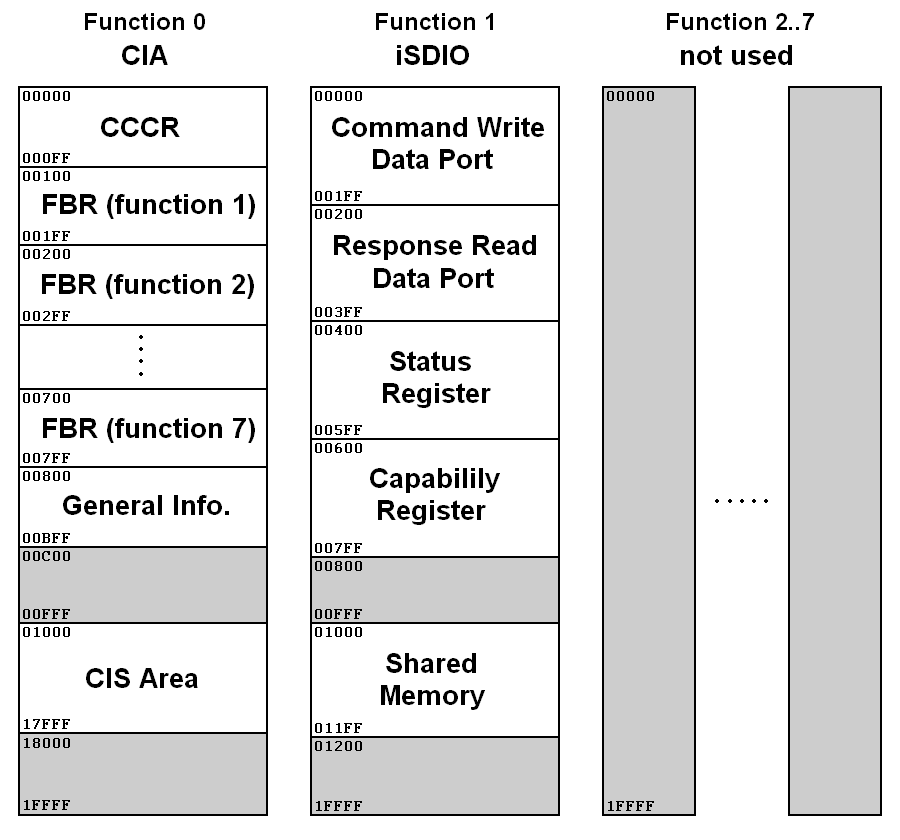
SDIO card can have up to seven I/O functions in it. The I/O function is controled by host system via SDIO register set. As shown in Figure 2, there are eight SDIO register areas that occupies 128K x 8-bit each. The function #0 register area is the common I/O area to identify and contorl all functions on the card. The function #1..#7 are the private I/O areas for each I/O functions. The Intelligent Controller of the FlashAir is the only I/O function mapped on function #1 area and any other function area is not used. Most SDIO register of function #1 area is to monitor the current working status of Intelligent Controller. Host system can also request some network controls and web services to the Intelligent Controller in highly abstracted iSDIO command. For more information, you should refer Part E1 SDIO Specification and Part E7 iSDIO Specification here.
To access the SDIO resisers by host system, there are two types of register access command set. One is CMD52/CMD53 defined in Part E1 SDIO Specification. It is used for traditional SDIO cards. It needs to be initialized in an SDIO initialization process with CMD5 to get the CMD52/CMD53 ready to use. The other is CMD48/CMD49 newly defined at SD Specifications Part 1 Version 4. It seems to be defined in consideration of existing host controllers specialized for only memory card with some restriction at transfer block size. It gets ready to use after an SD memory initailization process with ACMD41, so that it does not need an SDIO initialization process with CMD5. Note that FlashAir seems to be Type-W card. It supports only CMD48/CMD49 and CMD52/CMD53 is not supported.
The I/O function is independent of state of host interface. Any initialization and activity of the host interface for memory access does not affect any operation of Intelligent Controller. Only card power sequence, re-insertion of card for manual operation or socket power control for automatic operation, can reboot the Intelligent Controller.
The function of FlashAir can be configured with a configuration file placed on the flash memory. On every boot, the Intelligent Controller refers /SD_WLAN/CONFIG and configurs the its functions. Following is the content of configuration file of a brand-new FlashAir (be careful that the file and directory are with Hidden attribute).
[Vendor]

CIPATH=/DCIM/100__TSB/FA000001.JPG
APPMODE=4
APPSSID=flashair_b86b232aaae8
APPNETWORKKEY=***********
VERSION=FA9CAW3AW3.00.00
CID=02544d535731364731d830fc7900f501
PRODUCT=FlashAir
VENDOR=TOSHIBA
MASTERCODE=88708c75d5b7
LOCK=1
The most important items you would need to modify first are APPMODE, APPSSID and APPNETWORKKEY. The APPMODE defines which Wireless LAN mode of FlashAir is chosen on boot, AP (access point) mode or STA (station) mode. Rest of two define the SSID and network security key. Once the Intelligent Controller refers APPNETWORKKEY and saves it, the key string in the file will be replaced with *. After any changes to the configuration file, Intelligent Controller needs to be rebooted to apply the changes to operaion of the FlashAir.
There is a 512 byte of shared memory accessible by both host system and Intelligent Controller (with web API or user scripts). It can be used for arbitrary features, such as temporary storage, system global variables, inter-process communication and etc. The shared memory is mapped at the location 0x01000 to 0x011FF in function #1 register space. The content of shared memory is filled with zero on boot.
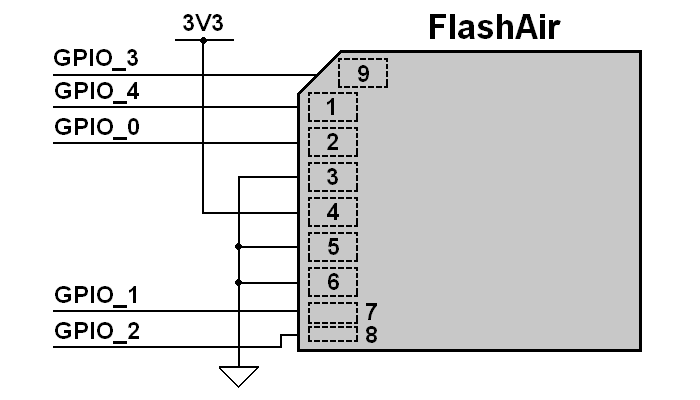
This is an only extra but interesting feature. FlashAir can work as a programmable netrowk device without any control by host system. The host inteface signals not in use can be used as five GPIO ports with user script or web API over the Internet. Note that FlashAir needs to be configured IFMODE=1 to enable this feature. Of course host interface function and GPIO fuction are exclusive each other.
First of all, you need to learn about the fundamental problem caused by using a shared resource with two or more independent systems. There are two systems, host system and Intelligent Controller, which can read and write the flash memory of a FlashAir. If both of them manipulate the data structure of file system on the flash memory without any mutual exclusion, the file system can be collapsed; as a result some files on the flash memory will be collapsed. The extent of damages is difficult to be estimated; nothing wrong might occure, some file content might be collapsed, a file might be gone or the FAT volume might be totally collapsed. You will be faced with this issue and need to take it into consideration to avoid risk of data loss when use FlashAir. I think I should have titled this article Praying with FlashAir and FatFs
.
The major preventive measure of data loss is to split each file access transaction, sequence of mounting volume - file operations - unmounting volume, on the time line with any mechanism in either way, automatically or manually.

I chose ARM and AVR project from FatFs Sample Project to modify it for the test project with FlashAir and FatFs. ARM and AVR are the microcontroller families widely used in various DIY projects. Figure 4 shows the hardware configuration for the ARM project. You will able to easily port the test project to any microcontroller board with SD card socket in your hand. The only thing needs to be considered on the hardware setup is that the FlashAir pulls over 200 milliamperes of peak current from the power supply.
I added some APIs on the device control module of FatFs to access the SDIO register of FlashAir. This is not for FatFs but for application. This enables to make application program in the various host system be able to access SDIO register with a regular API. The register access functions, ISDIO_READ, ISDIO_WRITE and ISDIO_MRITE, are implemented as additional command of disk_ioctl() function. The ISDIO_READ command reads a block of registers, the ISDIO_WRITE writes a block of registers and the ISDIO_MRITE command changes only specified bits in a register.
    SDIO_CTRL isd;     /* An argument structuer for iSDIO contorls */

   /* Read SDIO register (Read iSDIO WLAN Status Registers) */
   isd.func = 1;            /* Function = iSDIO */
   isd.addr = 0x00500;      /* Address = iSDIO WLAN Status */
   isd.ndata = 128;         /* Number of bytes to read */
   isd.data = buff;         /* Buffer to store read data */
   res = disk_ioctl(0, ISDIO_READ, &isd);

   /* Write SDIO register (Set data into Shared Memory) */
   isd.func = 1;            /* Function = iSDIO */
   isd.addr = 0x01000;      /* Address = Shared Memory */
   isd.ndata = 8;           /* Number of bytes to write */
   isd.data = buff;         /* Data to write */
   res = disk_ioctl(0, ISDIO_WRITE, &isd);

   /* Masked write (Clear MCU bit in iSDIO Status and others are left unchanged) */
   isd.func = 1;                   /* Function = iSDIO */
   isd.addr = 0x00420;             /* Address = iSDIO Status */
   isd.ndata = 0x04 << 8 | 0x00;   /* Mask and Data (b15:b8 for bit mask, b7:b0 for bit data) */
   res = disk_ioctl(0, ISDIO_MRITE, &isd);
SD Specs Part 1 Physical Layer Specification clearly defines that the register access command CMD48/CMD49 are not supported at SPI mode. However I found that FlashAir works with this command set at SPI mode against the specification. Perhaps it is because FlashAir is Type-W card supports only CMD48/CMD49, so that existing hardwares in SPI mode need to be relieved. Therefore disk driver in this project uses CMD48/CMD49 at SPI mode to access the SDIO registers.
FlashAir can receive file from web client via web API upload.cgi and store it into the flash memory. It will be useful to control the functions of unmanned system over the Internet. Note that FlashAir needs to be configured UPLOAD=1 to permit changes to the flash memory via web API.
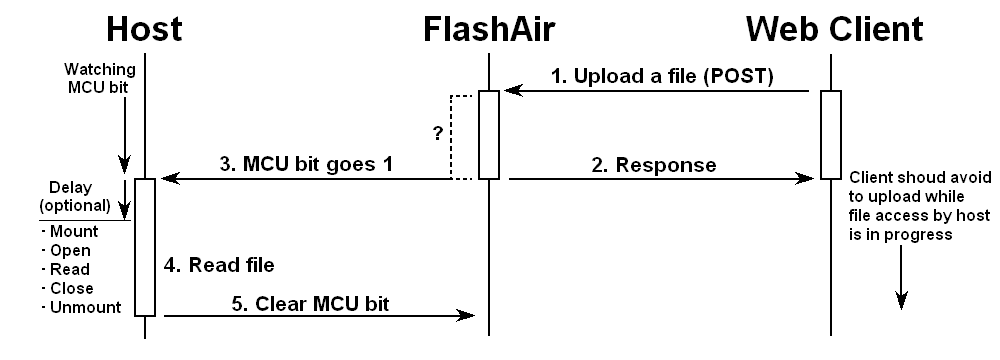
When any change to the flash memory is made by Intelligent Controller, a status bit (MCU bit in the iSDIO Status byte mapped at location 0x00420 in function #1 register area) will be set. Unfortunately FlashAir cannot generate an interrupt to the host system as defined in SDIO Specification because it does not support full SDIO specification but iSDIO specification. Host system needs to check the status bit periodically to detect changes of status. Figure 5 shows the sequence of file receive process.
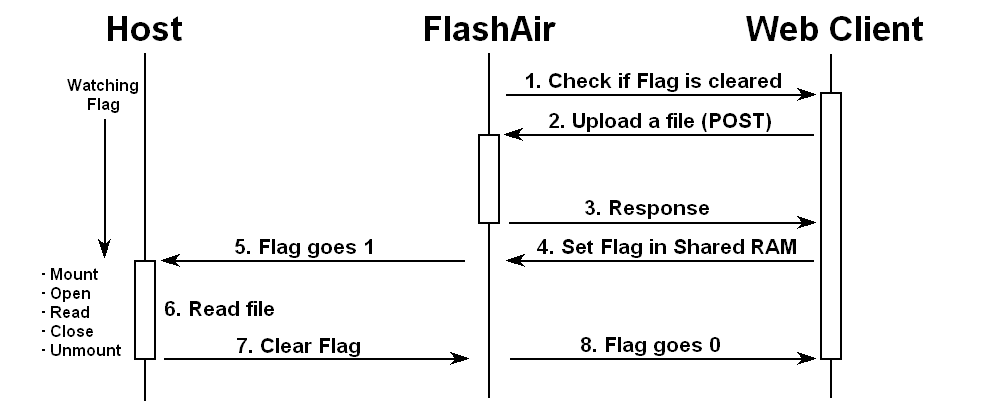
When would the MCU bit be set on, file open, first data write, last data write or file close, is not defined explicitly by specifications. This is a significant problem to refer the uploaded file by host system. There is a possibility that the file read by host system can still being updated by Intelligent Controller; as a result the host system might not recognize the file as expected. To avoid this problem, a certain delay after status change will be effective. To make sure end of the file write process, a strict handshaking via shared memory as shown in Figure 6 is suggested.
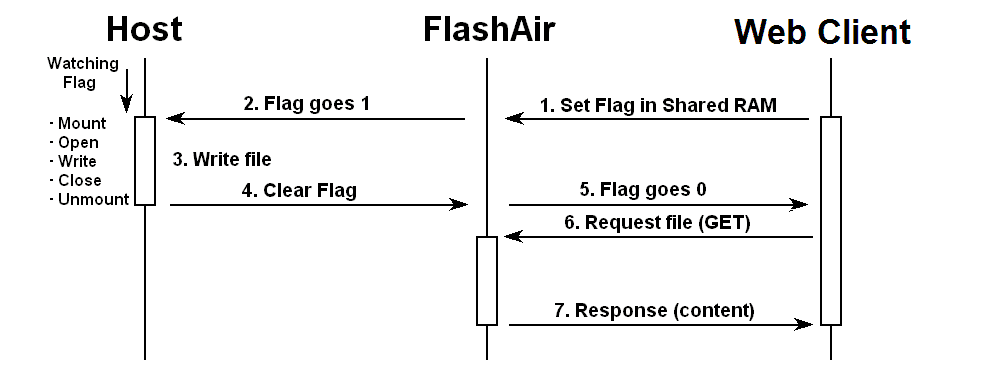
Host system needs to put file to be transferred on the flash memory. web Client can get any file on the flash memory with HTTP GET method every time. There is the same problem about shared resource as described above. If both host system and web Client are aware of FlashAir, also it can do a strict handshaking to avoid the problem as shown Figure 7.
Intelligent Controller has a capability for uploading file to the file server in HTTP POST method or FTP. There are two ways to initiate the uploading process.
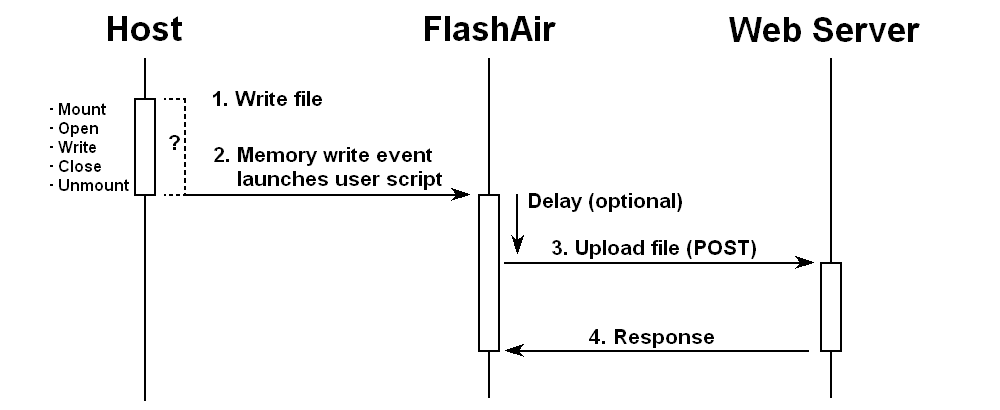
Any write event of the flash memory, such as file creation, updating, deleting and renaming, can launch a user script specified by configuration option LUA_SD_EVENT. The user script would upload the file to the file server with some built-in library function, fa.request() or fa.FTP(). Which is the file to be uploaded would be hardcorded or found by user script itself. Host system does not need to be aware of FlashAir. However when is the user script launched on is not defined by specifications. Probably, it will be on file open or first data write depends on the file system module, so that a certain delay is needed at start of the user script to make sure of finishing the file write process done by host system. Still, collapse of data needs to be considered since you choose this method. I do not recommend you this method of file uploading and would not supply any sample because this is very dangerous.
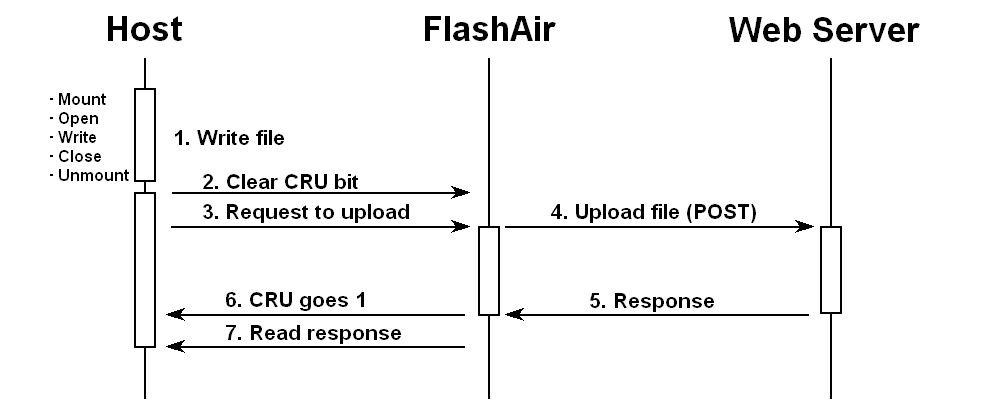
FlashAir aware host system can request some network controls and web services to the Intelligent Controller in highly abstracted iSDIO command. The iSDIO command/response packet is transferred between host system and Intelligent Controller via command/response data port mapped on the function #1 register area. The host controller must write cached information, such as directory and FAT, back to the flash memory prior to issue iSDIO commands and avoid any access to the flash memory during the process of iSDIO command. This means that the sanity of file system on the flash memory can be guaranteed during process of iSDIO command and data will never be collapsed. Right image shows a sequence of file upload process.
>u2 /dcim/100__tsb/fa000001.jpg elm-chan.org /fa/up.cgi
Process succeeded.
HTTP/1.1 200 OK
Date: Sat, 19 Dec 2015 07:18:51 GMT
Server: Apache
Content-Length: 10
Content-Type: text/plain; charset=iso-8859-1

Accepted.
>
FlashAir has a Real Time Clock (RTC) in it. However the files created/modified by Intelligent Controller has no timestamp because the RTC is disabled until an initialization by host system. To enable the RTC function, host system needs to set the current time with iSDIO command after every boot. t command of test monitor changes/examines on-chip RTC of the microcontroller. When set a time to the RTC, the time will be set to FlashAir as well.
>t 2015 12 20 0 0 0
Setting time to FlashAir...Ok.
2015/12/20 00:00:00
>
There are some monitor commands for network contorl. This is not related to file system but it may be useful to test FlashAir functions.
>nd
Ok.
>nl
Ok.
0780B0-D2E399 100% AES2 PLL-9806
A021B7-E53B44  52% AES2 CG-B00493
A41242-DD66E3  50% AES2 aterm-9e683d-g
A61242-DD66E3  47% WEP  aterm-9e683d-gw
>nc PLL-9806 4676995066258
Ok.
>ns
SSID      : PLL-9806
Encryption: WPA2-PSK/AES
Level     : 92%
Channel   : 1
MAC addr. : 0780B0-D2E399
IP addr.  : 192.168.0.9
Net mask  : 255.255.255.0
Gateway   : 192.168.0.1
DNS1      : 192.168.0.1
DNS2      : 0.0.0.0
>
